

S70 Lite GEN3X4 NVMe
addlink S70 Lite is a PCIe Gen3 x4 NVMe M.2 2280 SSD built for fast everyday computing and laptop upgrades, delivering up to 3500/2600 MB/s sequential read/write. It uses a DRAM-less design with HMB + SLC caching to balance speed, responsiveness, and power efficiency. Ideal for Ultrabooks, laptops, and Chromebooks that support NVMe PCIe Gen3, and for users who want faster boot times, app launches, and file transfers.
Up to 3,500 MB/s Sequential Read Speed
Upgrade a compatible PCIe NVMe system with sequential speeds of up to 3,500 MB/s read and 2,600 MB/s write. Actual performance varies by capacity, system configuration, and test conditions.
up to 7x faster
than SATA SSD
-
Up to 7× sequential read speed: S70 Lite at 3,500 MB/s vs. a SATA SSD rated at 500 MB/s. Advertised S70 Lite speeds are based on addlink’s internal CrystalDiskMark tests. Actual performance varies by capacity, system configuration, workload, and test conditions.
-
Requires M.2 2280 PCIe NVMe support and sufficient installation clearance. Not compatible with SATA-only M.2 slots.
-
DRAM-less Design with HMB + SLC Caching
The S70 Lite combines a DRAM-less design with HMB and SLC caching to support responsive everyday computing. Power consumption and battery life vary by system and workload.
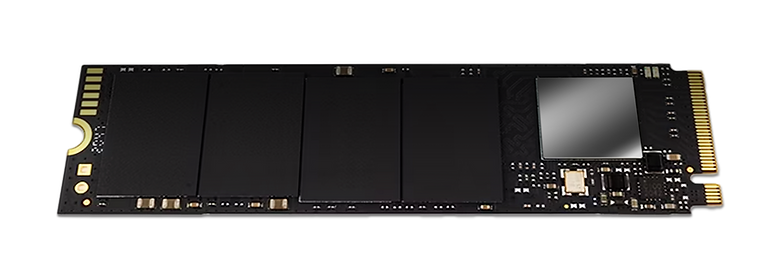


Gen3 Controller +
High-quality 3D NAND
Laptop Operation
Designed for Everyday Use

SATA SSD or HDD Replacement
-
Ultra-slim 2.25mm, single-sided M.2 2280 design fits thin laptops and devices with limited clearance—ideal for upgrades where thermals and power efficiency matter.

Thermal Performance Depends on Your System
-
Operating temperature varies with workload, ambient temperature, and system cooling. Adequate airflow helps maintain stable performance during sustained transfers.

Consistent Speed & Data Integrity
-
SLC cache improves overall speed and responsiveness
-
HMB enhances random performance for faster loading and multitasking
Multi-Device Versatility
-
Laptop/Ultrabook users upgrading from SATA SSD or HDD
-
Students & office users who want faster boot and smoother multitasking
-
Light content creators moving large photos/videos on a Gen3 NVMe system
-
Gaming PCs that need a responsive OS/game drive on PCIe Gen3 platforms


Media Recommendations

"The AddLink s70 Lite is a bargain NVMe SSD that’s priced lower than the competition and performs nearly as well as the high-priced drives. Enough said."

" The 1TB Addlink S70 Lite brings the fundimentals but falls short of being impressive. You just want the basic for gaming this is an option, but there are so many others available too."

" If you've been waiting to upgrade your system to an NVMe drive because the fast ones were too expensive or the cheap ones were too slow, now's the time to buy—the Addlink S70 has got you covered."

" If you're after a high-end, durable SSD that will last you a long time and don't mind spending a bit extra, we strongly recommend the AddLink S70. There are often some good deals to be found, too, especially for the lower-storage models."

" I am left nothing other than impressed with the Addlink S70. It's a super-fast based M.2 SSD that ticks all the right boxes. It is and remains to be a very strong performer, even without heatsink."

" A fast, unfeasibly affordable NVMe drive. At practically half the price of the almost identical competition it's an SSD no-brainer."

" The S70 represents a good value. Based on the real-world performance results and this excellent pricing strategy, we have no problem recommending Addlink's S70 for anyone shopping for an SSD on a budget."

" Designed to be used in areas that require constant processing without slowdowns, the new addlink S70 SSD competes rather well with popular NVMe drives, and has a price that will make you want one."
Why Choose the addlink S70 Lite?
addlink S70 Lite is a PCIe Gen3 M.2 2280 NVMe SSD designed for fast everyday upgrades, delivering strong performance with low power consumption—ideal for PCs and laptops replacing a SATA SSD or HDD.
Key Features
-
PCIe Gen3 x4 NVMe interface delivers responsive performance for daily computing and work
-
Up to 3500 MB/s read speed for faster boot, app launches, and file transfers
-
DRAM-less design with SLC caching + Host Memory Buffer (HMB) to boost real-world responsiveness
-
Built with 3D NAND Flash plus reliability features: LDPC ECC, Wear Leveling, Bad Block Management, Over-Provisioning
-
Compatible with Intel and AMD systems that support M.2 2280 PCIe NVMe SSDs.
-
Backed by a 5-year warranty for durability and value
Capacity Options
-
256GB / 512GB / 1TB / 2TB
Ideal For
-
SATA SSD or HDD replacement to speed up older laptops and desktops
-
Ultrabooks and laptops where power efficiency matters
-
Everyday users who want faster boot times and smoother multitasking
-
Students and office PCs needing a reliable NVMe upgrade
-
An Upgrade for PCIe Gen3 Systems
Designed for everyday computing and storage upgrades in desktops and laptops that support M.2 2280 PCIe NVMe SSDs. -
Thin laptops (2.25mm, single-sided clearance)
-
OS + apps drive upgrade for budget PCs (PCIe Gen3)
*Your system must support M.2 2280 PCIe NVMe SSDs and provide sufficient installation clearance. SATA-only M.2 slots are not compatible. Advertised speeds are based on addlink’s internal CrystalDiskMark tests. Actual performance may vary by capacity, system configuration, interface, workload, and test conditions.
**The limited warranty is up to five years, subject to the applicable endurance limit indicated by “Percentage Used,” which can be checked using CrystalDiskInfo. Please refer to addlink’s Warranty Policy for full terms and conditions.
Test Conditions / Benchmark Notes
-
Benchmark tool: CrystalDiskMark (default profile)
-
Test environment: Performance varies by platform (CPU/chipset), PCIe lane configuration, OS, driver/firmware version, and background tasks.
-
Workload factors: Results may differ by test size, queue depth, and whether the drive has available free space.
-
Thermals: Sustained transfers can increase drive temperature; adequate system airflow helps maintain stable performance.
-
Note: All speeds are up to values; actual results depend on system configuration and test conditions.