

Is Your Gaming PC or Workstation Bottlenecked by Slow Storage?Experience cutting-edge performance with PCIe Gen5.
Updated: Feb 23

This article discusses how the addlink G55H PCIe Gen5 NVMe SSD removes storage limitations for gamers, creators, and professionals by providing extremely fast speeds and outstanding thermal stability. It shortens game loading times, speeds up creative processes, and allows AI workstations to handle data rapidly, all while ensuring cool and stable operation.
Blazing PCIe Gen5 Performance: Delivers up to 10,300 MB/s read and 9,000 MB/s write speeds—20x faster than SATA and 2x faster than Gen4 SSDs.
Best for Gamers & Creators: Ideal for AAA gaming PCs, PS5 expansion, 4K/8K content creation, and AI workstations that demand sustained high-speed performance.
Thermal Stability Requirement: Achieving maximum speeds requires a PCIe Gen5-capable motherboard; older systems will operate at Gen4 speeds or lower.
Storage Bottlenecks in your daily Computing
Your gaming PC has a strong GPU and CPU, but you still experience 30 to 40 second load times for AAA games. Your 4K video editing project stutters and lags even though you have ample RAM. Your AI workstation processes datasets much slower than its theoretical capability. The problem isn’t your processor it’s your storage. Conventional SATA drives and even older Gen4 SSDs can’t keep up with the requirements of modern software, preventing your hardware from reaching its full potential.
Why is your Older Storage Can’t Keep Up
Modern applications—from AAA games to AI frameworks—generate and consume data at unprecedented rates. The bottleneck is clear:
Storage Type | Key Limitation |
SATA SSDs | Capped at 550 MB/s, creating severe bottlenecks for any demanding workload. |
PCIe Gen4 SSDs | Maximum ~5,000 MB/s, insufficient for sustained high-frequency operations. |
Older NVMe Drives | Poor thermal management causes throttling under sustained loads, reducing real-world performance. |
The Solution The addlink PCIe Gen5 G55H, Your Gateway to Gen5 Performance
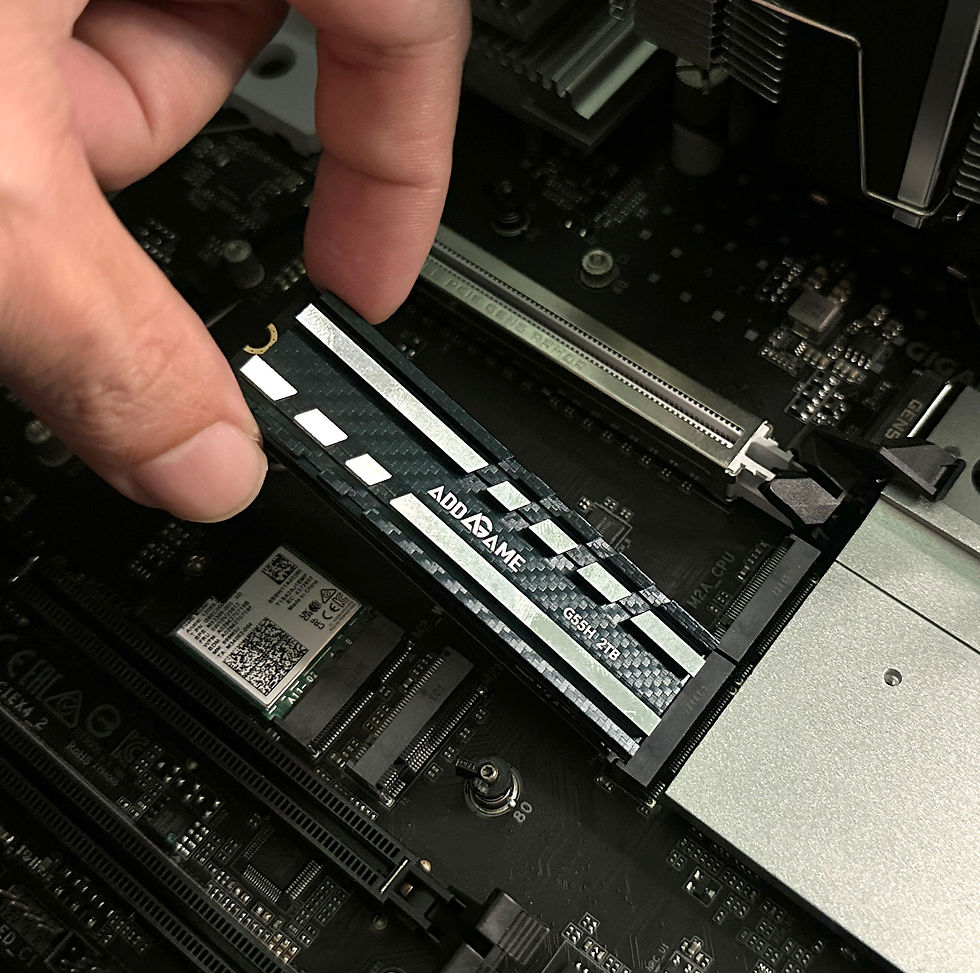
The addlink G55H PCIe Gen5 NVMe SSD shatters these limitations, delivering the speed and stability your system demands. It’s engineered for the next generation of computing.
addlink G55H Quick Specifications
Feature | Specification |
Interface | PCIe Gen5x4 NVMe (M.2 2280 form factor) |
Max Speed | Read: Up to 10,300 MB/s; Write: Up to 9,000 MB/s |
Capacity | 1TB / 2TB / 4TB |
Controller | 7nm Gen5 low-power controller |
Heatsink | 8.75mm aluminum with thermal silica pad (45% cooler) |
Power Efficiency | 50% lower power consumption vs. previous generation |
PS5 Compatibility | 100% compatible; heatsink fits within PS5’s 11.25mm height limit |
|
|
Why the addlink G55H Stands Out
Unmatched Speed for Gaming
Boasting read speeds of up to 10,300 MB/s, the G55H significantly cuts down game loading times. AAA games that previously required 30-40 seconds to load now start almost instantly. Asset streaming is smooth, removing the stutters and frame rate drops commonly experienced with slower drives.
Thermal Stability for Sustained Workloads
The high-quality aluminum heatsinks combined with a thermal silica pad disperses heat 45% better than other options. This ensures no slowdown during extended rendering tasks, lengthy video exports, or demanding AI training processes. Your drive remains cool, maintaining steady performance throughout.
Energy Efficiency for Always-On Systems
The 7nm Gen5 controller consumes 50% less power than previous generations, making it ideal for workstations that run 24/7. Lower heat output, lower power bills, and longer drive lifespan.
Comprehensive Drive Management
The included addlink M.2 PCIe SSD Toolbox software provides drive health monitoring, SMART status tracking, secure erase functionality, and detailed performance analytics. Keep your drive optimized and secure.
FAQ
Q1: Why does my 2TB G55H show only about 1.86TB in Windows or BIOS?
This is completely normal. Storage manufacturers calculate capacity using decimal (base-10), while operating systems use binary (base-2). A 2TB drive contains 2,000,000,000,000 bytes, which converts to roughly 1.86 tebibytes (TiB) in binary terms. This difference is due to math, not a defect.
Q2: What is the maximum speed, and why might I not reach 10,300 MB/s read or 9,000 MB/s write?
The listed speeds represent theoretical maximums under perfect conditions, measured with CrystalDiskMark. Actual speeds depend on factors like your motherboard’s PCIe Gen5 support, the quality of your M.2 slot, system workload, file types, and temperature. Most users experience speeds between 8,000 and 10,000 MB/s during typical use, which is still excellent.
Q3: Will the G55H work in my PS5? Does the heatsink fit?
Yes, the G55H is fully compatible with the PS5. Its heatsink is designed to fit within the PS5’s 11.25mm height limit, measuring 8.75mm tall. It functions perfectly as a PS5 expansion drive. Just make sure your PS5 firmware is updated to the latest version to support Gen5 drives.
Q4: Is the G55H backward compatible with older PCs or laptops?
Yes, the G55H works with PCIe Gen4 and Gen3 systems as well. However, it will run at the maximum speed supported by your motherboard. For example, on a Gen4 system, it will operate at Gen4 speeds (around 5,000 MB/s). To achieve the full 10,300 MB/s speed, a Gen5-compatible motherboard is required.
Q5: Does the G55H get hot? Is the heatsink sufficient for gaming?
The G55H comes with a high-quality aluminum heatsink and a thermal silica pad that dissipates heat 45% better than standard designs. While gaming, the drive will warm up but typically stays below 60-70°C under normal conditions. The heatsink is more than capable of handling extended gaming sessions. For best results, ensure your PC case has good airflow and avoid blocking the heatsink.
Q6: How does the G55H compare to other Gen5 SSDs in power efficiency?
The G55H uses a 7nm controller designed for power efficiency, consuming 50% less power than previous generation controllers. This results in less heat, lower system power usage, and a longer lifespan for the drive. It is among the most power-efficient Gen5 SSDs available, making it ideal for laptops and systems that run continuously.


Comments